
No Credit Card Required To Test Drive Our White Label SEO Tool Set


Find all of your SEO tools in one place with Raven Tools. Conduct keyword and competitor research, manage link building and report on your progress.
Our site auditor evaluates 17 different metrics to make sure your technical SEO game is strong. Find Problems. Fix it. Start Ranking.
Local and global keyword and competitor data from Moz, Majestic, Google, Bing, IBM Watson, and Calais

Get an advanced look at domain backlinks. Spy on your competitors. Identify toxic links, and follow up on discoveries with the Link building CRM

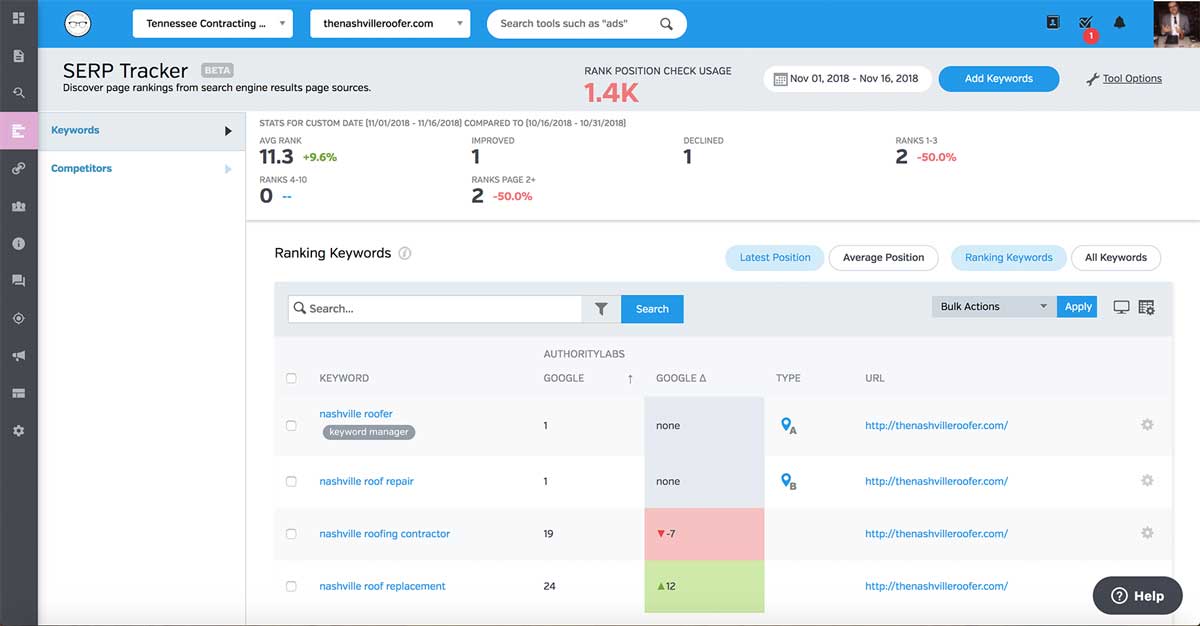
Track keywords on-demand by search engine, location, zip code, device - daily / weekly / monthly with Authority Labs data.

See traffic, conversion, and all of your important SEO data from: Search Console, Google Analytics, Keyword Planner, Adwords, & Bing Webmaster Tools.

Ads [Google, Facebook, Instagram, Bing]. Twitter, LinkedIn, Facebook, Youtube, Mailchimp, Campaign Monitor, Emma, Constant Contact, Aweber, and Call Rail.
The site crawler grabs your pages and provides a summary of total issues and buckets out 17 types of issues by: Visibility Issues, Meta, Content, Links, Images, Semantics, Page Speed for Desktop and Mobile, and a Crawl Comparison.
After crawling all of your web pages a detailed report is generated with a site health score out of 100. All onpage technical site problems and optimization opportunities are then generated by order of severity. Don’t care to fix something? Hide the findings. Want an easy way to manage the fixes? The website auditor generates your results as a checklist that can be marked off as you go.
Not an SEO guru? Don’t worry, if you don’t know how to fix the issues we give you the ability to share your results. Many businesses use this to share their audits with their webmasters, SEO, or just with Facebook and Twitter.
Schedule your site to be analyzed weekly or monthly to make sure you keep your site search engine friendly. We’ll monitor and alert you when we find new problems or optimization opportunities.
Feel free to analyze from any device. Run an audit from your computer, your tablet, or from a mobile phone. Talking to a potential client? Generate quick and accurate audit reports on the fly.


Since we let you schedule your checks, we based pricing on a single check, of a single keyword, on a single device, on a single engine. We've included 15,000 rank position checks in our Start package and even more for our Grow - Lead accounts.
This means that you can have 3,750 weekly keywords tracked in a given month for Start accounts. If you need additional keywords, it's only $.003 per additional keyword.
Google personalizes SERPs based on the user's physical location and the type of device used. That's why the best rank tracking tools to keep track of your local SEO efforts track the same keyword customized by specific zip codes. You can also choose to track how your site ranks on mobile devices vs desktop searches.

Raven Tools extracts data from our third-party partner, Majestic, to uncover up to 50,000 backlinks for any URL. Not only can you identify the link but you can categorize by:
After you’ve identified a backlink, with a click of the mouse you can add a backlink to Raven Tool’s Link building Management tool. With Raven Tool’s generous user licenses you can easily outsource your link building campaigns and have a link builder operate within the platform.
Link building deserves it's own personalized CRM, as it's a very unique management process.
Identify toxic links. Not all links are created equal and not all links are helpful. A no-follow link gives you no authority but gives you visibility, while a toxic link is a link that harms authority in Google’s eyes.
Backlink Explorer identifies the good and the bad and assists your SEO plan by empowering you with actionable insights.
With Raven Tool’s Link Spy, you can even identify competitors and surface their backlinks for competing pages. The Site Finder tool can search by location and can search out by keyword.
The list filters by Moz page authority or it's mashable score, but it can also be filtered by the top 10 positions on the SERP. Group or ungroup all competitor links and identify link building opportunities.

Get domain info on a variety of data points: Quality, Keywords, Pages, Backlinks, Neighborhood, Compare, Semantic, design, and social metrics.
Keyword research uses the Google data connection to give you ad data, search volume data for location and for global, along with competitor info by selected keyword.
Identify the search volume of a keyword and generate similar search phrases with search volume metrics and an advertiser competition score. Raven Tools integrates with Google Keyword Planner and provides you data straight from the source. If you integrate Google Search Console, we also display average rank data.
After KW research, our Keyword Manager allows users to upload through CSV, organize and store the keywords that are important to your link building and PPC campaigns. You can store an unlimited amount of keywords and you can organize based on filters or by tags. For example, you can create tags to identify brand terms or group related keywords such as “SEO”.
Since Raven Tools is an all-in-one integrated platform, you’ll be able to send keywords from other areas of Raven Tools (such as Search Analytics and Research Central) with a couple clicks of the mouse.
Lastly, easily surface a list of all important SEO metrics for your site and competitors to get a side by side analysis that looks at things like backlinks, citation flow, trust flow, domain authority, load time, page speed, overall preparedness, domain registration, and a range of social integrations.


Raven Tools integrates with Google Analytics, Search Console, Majestic and Moz. We store historical data from Google so it won’t be deleted (which Google now does). We pay for Moz and Majestic so you don’t have to spend hundreds more. We also give you the ability to surface specific SEO-centric metrics to easily identify important SEO data points, while giving you the tools to analyze through a variety of visualizations.
View PPC data from three different sources: Google Ads, Bing Ads, and Facebook Ads. View Impressions, CPM, CTR, conversions, clicks, conversion rate, total conversion value, cost per conversion, and see what each ad looks like on the SERP or on social with important metrics side by side with your ads. View insights through line charts, KPIs, or charts. Combine PPC data in your automatic reports and place it side-by-side your organic campaign data.
Manage all your twitter, facebook, linkedin, and youtube accounts in one place. Schedule posts. Comment and like from the Raven Tools Dashboard. Who knew you could avoid distraction on social media? View all the important metrics on things like replies, your reach, followers, retweets, shares, and a host of other metrics.
Manage your email marketing from the Raven Tools dashboard. View every aspect of your email campaign as if you were in your email marketing dashboard on Campaign Monitor. See your open rates, click rates, unsubscribes, and view everything with a line chart to visualize the data. Create events and tag specific campaigns to keep track of specific emails.
Add CallRail to view your entire Callrail dashboard inside of Raven Tools. Just like every other data source, we connect this with the report generator and allow you to take specific metrics from Callrail and surface KPIs side-by-side your entire marketing campaign.
Raven Tools allows you to post to multiple WordPress installs from the content marketing dashboard. Not only that, but you can order content for your site within Raven Tools as well. We’re also hard at work to add content optimization tools that we’ve tested to make sure that you’ll have an upper hand ranking.

